Archive

Author Archive

Apache prefork tuning.

April 21st, 2012

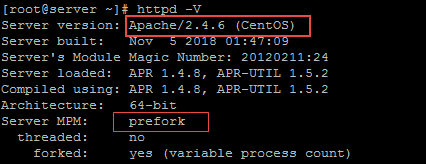
Modular structure of apache is one of the reason for its global dominance among webservers.We have the flexibility to adding or droping modules.Before we deal with apache prefork MPM we need to have a basic idea about apache Multi Processing Modules,Multi processing Modules (MPM) are the multiple request (hundreds to kilos) handling ‘department’ of apache.We can compare MPM as ‘valve’ of apache , it accept requests, spawn the child processes according to the inflow of requests and assign the child process for the incoming connections.
Worker and Prefork are two major MPMs used in Linux platform.Both have their own pros and cons. Prefork is a non-threaded MPM while Worker is a threaded MPM. i.e prefork will generate pre-defined number of httpd procesesses(StartServers parameter) during startup and dispatch more child processes as the request increases. But in the case threaded worker MPM it will startup pre-defined number of httpd processes and a single process will hadle multiple connections.

Since prefork have a one process per thread structure it can provide isolation among different connections. So we can say that it is more secure at the cost of more RAM and CPU power. Worker MPM needs less RAM and CPU power but does not provide same level of request-to-request isolation as a process-based MPM does.Now let us look in to the prefork MPM tuning which is more common MPM than worker.

Prefork Directives

Example for prefork directives

StartServers 8
MinSpareServers 5
MaxSpareServers 10
MaxClients 30
MaxRequestsPerChild 500

StartServers : Number of apache child processes generated during the apache startup.

MinSpareServers: Spare servers are child processes in idle(not handling any requests). If the total idle processes are less than
MinSpareServers directive then apache parent process will create child processes up to MinSpareServers .

MaxSpareServers: If the total idle child processes is more than this directive , then parent pocess will kill additional idle processes.

MaxClients: This is the most important MPM directive for tuning apache performance.Parent process will dynamically spawn new child processes as the incoming request raises. MaxClients is the maximum child processes created for handling requests or in other words it is the max simultaneous requests apache can handle. This value should be optimal. If it is too low apache can only handle few requests and excess requests will be queued and it may get timed out.If it is too high server will begin to swap and it seriously affects entire server performance.

MaxRequestsPerChild: After handling this much requests child process will die .MaxRequestsPerChild is the requests that a child process will handle in its life time.If it is too low in a busy server, apache will utilize a good CPU power for killing and spawning new child processes which may cause more CPU burden. But at the same time it is always good to recycle it in a timely manner, otherwise it may cause common issues like memory leak , process bloat etc.

How to set MaxClients.

Before choosing a value we need to analyze the server , i.e check the RAM size and applications running other than apache like mysql , java applications etc. Then roughly calculate the memory dedicated for those applications . For example ,we might have defined innodb buffer spool size for mysql and java heap size for java applications . Substract that much memory from total RAM size. Suppose you have 2 GB RAM and 500 MB allocated for mysql(it depends on your DB size) and 250 for java and reserved some memory for system applications ,in this setup we can reserve memory up to 1 GB for apache . On next step we need to calculate avereage process memory usage for apache. For calculating it , during the peak traffic time run the following command

ps aux| awk ‘/apach[e]/{total+=$6}END{print total}’ this calculates total physical memory used by all apache process , to calculate average memory usage ,devide above value with total apache processes .
Finally we can optimize MaxClients value by deviding memory reserved for apache (1G) by process’s average memory usage. (Lets imagine its 35M here) .

MaxClients <= 1G/35 M = 30. We can reduce avg memory usage by removing unwanted apache modules and using php cache like PHP op-code cache/accelerator .If serever have good traffic, then fix the MaxRequestsPerChild deirective some higher values like 2000. Thoroughly observe server for some days after tuning , some time you need to tweak it 2 – 3 times for getting the best result. Good Luck!

VN:F [1.9.6_1107]
Rating: 10.0/10 (1 vote cast)
VN:F [1.9.6_1107]
Rating: 0 (from 0 votes)

hans linux , , ,

Basics of iptables

December 17th, 2010

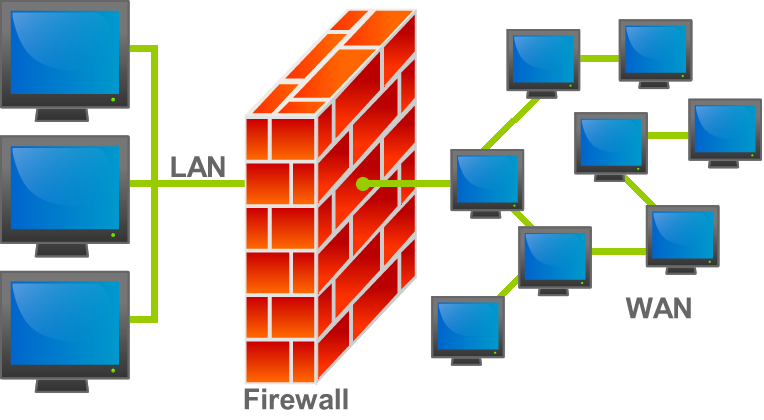
Iptables is the default firewall used in many present Linux distros. It is a project under netfilter. Previously it was known as ipchains (For 2.2 Kernels) , ipfwadm(for 2.0 kernels) and nftables are their future project..Iptables are designed for ipv4 and ipv6table for ipv6.

From ipfwadm to iptables , we can see marginal modifications done in design and hence in features. In ipfwadm a rule set matched the packets and actions are taken on that packets , then in ipchains , chains are Incorporated and the rules will decide , through which chain the packets need to be traversed, then in iptables , tables are introduced so that the user can choose proper table based on his requirement , that means he can choose filter table for packet filtering . NAT tables for source and destination natting then mangle table for packet modifications.(We will discuss more about tables later ). Connection tracking capability is the yet another advancement with iptable. So we can say it as a statefull firewall. Rate limiting , system logging etc. are the other features included in iptables apart from it’s predecessors.

Iptables gets it’s ascendancy through the modularity and integrity with the kernel. It exploits the modularity of linux kernels. A bunch of kernel modules need to be loaded for the full operation of iptables.

ip_tables iptable_filter ip_conntrack ip_conntrack_ftp
iptable_nat ip_nat_ftp ipt_limit ipt_multiport
iptable_mangle ipt_state ipt_REJECT ipt_LOG

These are some of required kernel modules. All are not required for all applications. For loading modules in bootup add script in rc.local using modprobe command. And also we need a kernel with some specific config options .If it’s not there we need to recompile the kernel to exploit the functions of iptable. For latest kernels almost all options are included , rarely need to be recompiled. Some important options that need to be compiled in to kernel or as modules are

CONFIG_PACKET
CONFIG_NETFILTER
CONFIG_IP_NF_CONNTRACK
CONFIG_IP_NF_FTP
CONFIG_IP_NF_IRC
ONFIG_IP_NF_IPTABLES
CONFIG_IP_NF_FILTER
CONFIG_IP_NF_NAT
CONFIG_IP_NF_MATCH_STATE
CONFIG_IP_NF_TARGET_LOG
CONFIG_IP_NF_MATCH_LIMIT
CONFIG_IP_NF_TARGET_MASQUERADE .

You can check your current kernel configuration by cat /boot/config-`uname -r`.As I already told the latest kernels are incorporated with almost all netfilter options. So you seldom need to worry about that.

Packet flow in iptables

Next I would like to draw a vignette of packet flaw in iptables. There is definite order for traversing of packets through the different tables and chains in iptables. Basic understanding of that order is mandatory for writing complex firewall rules.

Iptable comprised of three tables , MANGLE , FILTER and NAT table.
Each tables have it’s own chains for packet processing.
MANGLE table : This tables is responsible for the alternation of QoS bits in TCP header.For example TOS (Type of service) bit. But it rarely used for simple networks.Mangle table have five chains ,PREROUTING, POSTROUTING,FORWARD,INPUT and OUTPUT.

FILTER table:This is the most used table in small network environments.This table is responsible for packet filtering on the basis of corresponding rules. This table have INPUT, FORWARD and OUTPUT chains. Most used target and jumps in this table are ACCEPT, DROP/DENY and REJECT. We will discuss about this target and jump later.

NAT table:This table used for network address translation which is a imperative feature of routers.It have PREROUTING chain (for Destination address translation) FORWARD chain (address translation for packets from router itself) and POSTROUTING chain( for source address translation).

When packet reaches the hardware(NIC) it will be processed to hardware driver and through kernel.Then it traverse through different tables and chains in the iptables in desired order. In each chain , iptable compare the rules in that chain with that packet information , if it finds a match then action is taken based on that rule.(eg:REJECT) .If a packet is matched with the first rule in a chain , it will not check the second rule in the same chain , it will jump to next chain in the order.

The following figure will help you to understand the packet traversal through iptable chains.

Options with iptable command.

-t Specify the table. By default FILTER table is taken .
-j Jump to the target
-A Append the rule to the end of the chain.
-F Flush. Deletes all the rules in the selected table
-p Match protocol. Types include, icmp, tcp, udp, and all
-s Match source IP address
-d Match destination IP address
-i Match “input” interface on which the packet enters.
-o Match “output” interface on which the packet exits
-m used to match certain conditions . eg: state ESTABLISHED

Targets and Jumps with iptable

DROP/DENY : When a packet is dropped or denied it is simply  abandoned and no notification is send to the host. ie the packet disappears with out taking any further actions.

REJECT : The host reject the packet and sends reply to the sending host , saying that the packet was dropped. Other wise it is same as that of DROP/DENY.

ACCEPT : This will accept the packet that matches the corresponding rules.

LOG : The packet information will be logged with syslogd daemon.

SNAT : Source nat used in NAT table POSTROUTING table for manipulating source ip address.

DNAT: destination NAT used in NAT table PREROUTING table to manipulate destination ip address and for port forwarding.

MASQUERADE : To change source ip address to the ip address of corresponding router network interface.

Iptable commands and rules

iptables -L : To list all present rules in a table (By default it will show FILTER table rule.To specify the table use -t )
iptables -t nat -L (list all NAT table rules)
iptables -v -L : more detailed information about the rules
iptables -F

: it will flush all rules in that table.
iptables -t table -D : to delete a particular rule from a tables’s chain. Or else we can give the rule number in that chain . eg: iptable -t nat -D PREROUTING 2
iptables -P : To set the default policy of a chain in FILTER table . eg: iptables -p OUPUT DROP
Rule to allow only SSH traffic


iptables -A INPUT -p tcp -s 0/0 --dport 22 -j ACCEPT <This will allow port 22 on INPUT chain of filter table)
iptables-A OUTPUT -p tcp -m state --state ESTABLISHED,RELATED -j ACCEPT
iptables -P INPUT DROP

Rule for port forwarding


 iptables -t nat -A PREROUTING -p tcp -d  'destination ip' --dport 80 -j DNAT --to-destination 192.168.1.10:80
Packet destined to 80 port of your public ip will be forwarded to the 80 port of private ip.We appending rule to the PREROUTING chain of NAT table.
iptables -A FORWARD -p tcp -s 0/0 -d 192.168.1.10 --dport 80 -j ACCEPT

I think this is enough for the basics. I will write more advanced rules on my next article. Try it!!!!!

VN:F [1.9.6_1107]
Rating: 5.3/10 (3 votes cast)
VN:F [1.9.6_1107]
Rating: +1 (from 1 vote)

hans linux , ,

Git access control with Gitosis

October 27th, 2010

There are many open source version control systems like Bazaar, Arch, Aegis, SVN ,CVS , Git etc. All systems have there own pros and cons. But I personally like Git due to it’s flexibility and possibilities.It have an excellent network compatibility. We can use the native Git protocol, but it also works over rsync, ssh, HTTP and HTTPS. Access control is the more painful headache for admins. ie who can commit , who can access projects etc. Here we can manage git repositories with gitosis , which is a tool for git access control . More safe thing is gitosis can be used with ssh-key authentication which is one of the most secure data transfer methodology in linux. While we use key-authentication we don’t need to create that user in Git server , it tighten security further becuase developers will not get shell access on server. There should be a Git user in server , here I am creating a user as ‘git’ in server.

If you don’t have Git on your machine install it through yum(Redhat based) or apt-get(Debian based) depending up on your OS.

# apt-get install git-core

For the installation of gitosis we need python-setuptools package in our server.

# apt-get install python-setuptools

Now we can download gitosiis from it’s git repository.

# git clone git://eagain.net/gitosis.git

it’s of few KBs .Now install it with python script.

# cd gitosis
# python setup.py install

create an user as git(you can give any name) . Give him a shell otherwise ssh login might have problems ,then give the desired home directory.(which will be the Git Root directory).

It’s the time to upload public key to Git server. If you have a public-private key pair in local machineuse it , otherwise create a new one with ssk-keygen.

# ssh-keygen -t rsa

Public key will be in name id_rsa.pub . Copy the key and upload it to the server.

Next , execute the command

# sudo -H -u git gitosis-init &lt; /tmp/id_rsa.pub

This will add some directories and files in to user git’s home directory and append the public key to authorized keys file of user git.
Now clone the gitosis-admin repository to your local machine.

$ git clone git@GIT-SERVER:gitosis-admin.git
$ cd gitosis-admin

If you list this directory you can see only two directories .Here You can create new projects , make changes , do access control etc. What ever you do , you have to commit it and push it to the server to replicate the changes on server. Since we cloned gitosis-admin repository we can make all changes locally and push it to the server.

Creating new repository and control access on new repository.

For creating a new repository , edit the gitosis.conf file and add the entries as follows.
Here I am assuming that the new repository name is ‘test’

[group testgroup]
members = hans
writable = test

Here group is just a name , no matter what it is. member is the list of users who can access the repository and ‘writable’ is the name of repository. Commit this changes and push it to the server.

$ git commit -a -m &quot;comment for this commit&quot;
$ git push

Create the directory ‘test’ and initiate it as a git repo.

$ mkdir test
$ cd test
$ git init

Add remote server url to the new repository config file.

$ git remote add origin git@GIT_SERVER:test.git

push the changes in to the server.

$ git push origin master:refs/heads/master

Eventhough we allowed user hans to access ‘test’ repository , we didn’t add his public key to the server . So he will not be able to access the project repository. So copy his public key to ‘keydir’ as hans.pub . It should have a ‘.pub’ extension.

$ cd gitosis-admin
$ cp /home/hans/hans.pub keydir/hans.pub
$ git add keydir/hans.pub
$ git commit -a -m &quot;comment&quot;
$ git push

Yes we done it !
Now user hans can clone the test repository to his local machine. He can make changes ,add files ,commit ,and push changes to the server.

hans $ git clone git@GIT_SERVER:test.git
Now try it. Good Luck !

VN:F [1.9.6_1107]
Rating: 4.5/10 (2 votes cast)
VN:F [1.9.6_1107]
Rating: -2 (from 2 votes)

hans linux , ,

Port based routing in Linux.

October 2nd, 2010

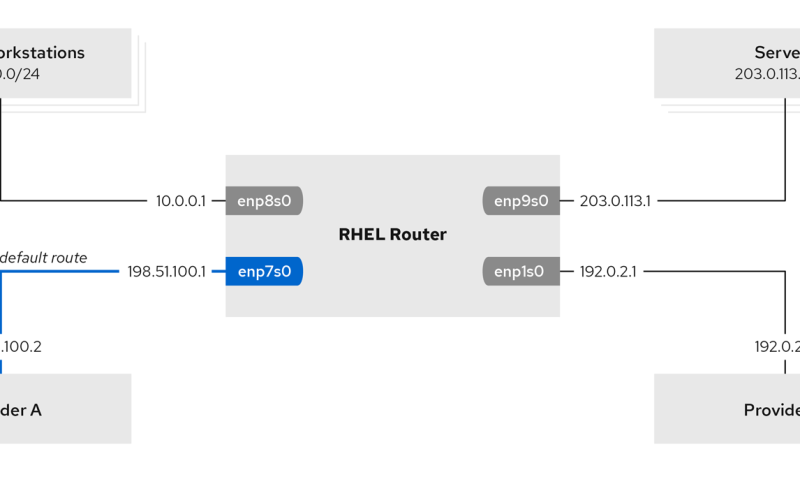
By default, routing is based on destination IP address, i.e., the routing table will decide where to route the packet depending on the destination address field in the packet. But there are a number of other utilities and options on routing in linux. One interesting fact is that most of the routers are using linux kernel for their IOS (inter operating system). Isn’t that cool? Now you can use your linux machine as your local router with more confidence, right?

Other than destination IP address we can also use source IP address , Tos (Type of service) , fwmark (Marking of packets by kernel) and the interface on which packet arrived as the parameters for routing decision. Before getting in to IP routing let me explain some scenarios where we need Advanced routing features. Suppose we have 3-4 gateways and we can easily differentiate them on their bandwidth, reliability, QoS and cost, which one do we select? We would definitely choose the one with the best combination of all these features. But if everyone selects that gateway and start using it, it would obviously be overwhelmed with the traffic. So it is best to differentiate services based on their priority. We should give more priority to services which need higher bandwidth or more reliability. Then the route packet will be used by higher priority services through the most reliable gateway. One example for such service is the SSH.

Now let’s begin with the commands for this advanced routing feature. We will be using the combination of iptables, IP route and IP rule commands here. All linux systems have an iptable package by default. If you don’t have IP route or IP rule command, you have to download the iproute2 package. Before writing the rules on iptables, check kernel modules and options that are required for the full operation of iptable. But since the latest kernels have all the modules and options for iptables you will not have to worry about it.

Let’s start from the iptable. Here we shall take SSH as the service for routing. Use ‘mangle’ table of iptable for modifying the SSH packets. We will need root access for this. We are assuming that SSH is using its default port 22.

1. #iptables -t mangle -A OUTPUT -p tcp –dport 22 -j MARK –set-mark 0×1

We are marking all packets with destination port 22 as ’0×1′ .Now save and restart iptables.
#service iptables save
#service iptables restart

To delete this entry from iptables we can use -D instead of -A.

2. Next, create a new IP route table in /etc/iproute2/rt_table by just giving an entry

100 sshtable

3. Write rule for SSH packets.

#ip rule add fwmark 0×1 lookup sshtable

4. Add route at new table sshtable. Here we shall use ’192.168.1.1′ as the gateway for SSH. All other traffic will go through the
default gateway, which can be seen by IP route show command.

We copy all entries except default gateway entry from main table.
# ip route show table main | grep -Ev ^default | while read ROUTE ; do ip route add table sshtable $ROUTE; done

Add default gateway entry for SSH packets to table sshtable .

#ip route add default via 192.168.1.1 table sshtable

Use “ip route show table sshtable” to show all routes at sshtable.

That’s it..we have done it!!!

You can use SSH to log into your remote server and check your IP with “last” command. You can see that it’s showing your new gateway public IP other than the default gateway. You can use the same for web traffic. Use tcp ports 80,443 ,53 and udp 53 instead of 22 in the above example.

If you want perpetual route settings during reboots, make the following entries in /etc/sysconfig/network-scripts/route-eth0
and /etc/sysconfig/network-scripts/rule-eth0 .

If these files are not there, you can create them and:

in rule-eth0 file paste the following.

fwmark 0×1 lookup sshtable

in route-eth0 add the following line:

default via 192.168.1.1 table sshtable

Then paste # ip route show table main | grep -Ev ^default | while read ROUTE ; do ip route add table sshtable $ROUTE; done in /etc/rc.local file.

Good luck!

VN:F [1.9.6_1107]
Rating: 10.0/10 (3 votes cast)
VN:F [1.9.6_1107]
Rating: +5 (from 5 votes)

hans linux , , , , , , ,