Archive

Archive for the ‘Mailservice’ Category

Email Feedback Loop (FBL)

February 20th, 2010

What is FBL

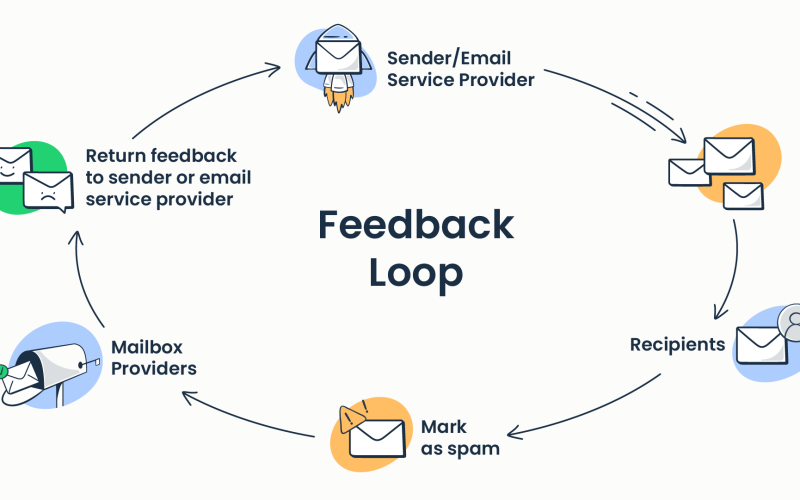
Usually when users do not want to receive any more mails from an email account they just click the “report spam button” available in their web mail or mail client. As a result of that a complaint will be raised against the ip from which this email is sent and the isp will start blocking this ip after the complaint rate increases a certain limit. So it is crucial to know the users who do not want to receive mails from us  so that we can remove them from the mailing list and mails will not be sent to these users again. A feedback loop is a mechanism whereby an ISP will let you know when one of its subscribers complains about your e-mail.

How to Sign up For Email Feedback Loop

To use this service, you should send a request for an ISP feedback loop either via email or through a web form. Most of the ips provide a web from to register their feedback loop program. The usual information you need to provide to sign up for a feedback loop are:

* IP addresses that you want to receive feedback loops for

* The list of domains you want to subscribe

* A valid abuse@ and/or postmaster@ email address on the domains you want to subscribe

* Your contact information: name, contact email and phone number

* The email address a feedback loop will be sent at

* Quantity of email messages sent daily (weekly, monthly) to the domain of the feedback look

* Type of email content you send

A confirmation email will be sent to the contact email address you specify. Once your request has been approved, Feedback Loop email will be sent to the email address listed in the “Feedback Loop Email” field.

How FBL Works

1. Sender sends a mail to the user

2. User complaints to his ISP about the message by hitting the report spam button

3. The sender  will be notified when a recipient complains about your email.

4. The sender will receive an email message saying something like “a spam complaint was registered for the IP address xxx.xxx.xxx.xxx”.

Sender’s original email message will be attached to that notification email.

Advantages of Feedback Loops

Feedback loops help you reveal unhappy subscribers, improve your email deliverability and decrease your spam complaint rate. This helps you to maintain a good reputation for the ips. Feedback loops allow you to check  deeply into your sign up process that adds user to their mailing list when one user signs up. Increased complaint rate can be caused by subscribers not realizing what they signed up for, subscribers not getting what they thought they signed up for, or a long delay between sign-up and the first mailing. So these feedback loops help the sending organization to improve the quality of their sign up process.

Different Feedback Loop Programs

Every ISP’s feedback loop is different, making the aggregate data sometimes challenging to manage. Some use a standardized format – the Abuse Reporting Format. Some send feedback in real time, others send in batches. Many send the entire offending message, others only provide the e-mail address – and still others send the body of the message but no address. For Yahoo only senders who sign their outbound emails with DomainKeys and/or DKIM are eligible to participate in their feedback loop program. AOL will only active the service after an ip ownership test.It verify that a particular domain has a right to receive abuse complaints for the ips in the submitted request. There are five possible tests to prove IP ownership. Passing any one of the five tests says “AOL, yourdomain.com has a right to receive abuse complaints on behalf of our IP.” Also different isps are providing options to modify the existing feedback loop. You may add more ips or remove existing ips through web forms. Also in any point if you do not want to use feedback loop service from an isp you may write to the postmaster department of corresponding isp for that.

Conclusion

This one-time action will help you keep a good email sender reputation and improve your email delivery rate into the recipient’s Inbox. So it is always better to have feedback loop.

VN:F [1.9.6_1107]
Rating: 8.8/10 (6 votes cast)
VN:F [1.9.6_1107]
Rating: +2 (from 2 votes)

Tino Thomas Mailservice ,

Qmail flush stuck queue

December 5th, 2009

Qmail is a wonderful MTA in all sense but its quite easy to have the troubles like your queue getting filled up and you don’t know how to flush the queue. I’ll give you some insights how to do that

If you have already downloaded qmHandle you can remove the mails by issuing the command

qmHandle -S'failure notice'

Here we have deleted all the mails with the subject “failure notice” change it as per your needs, but I don’t think qmHandle can work on a busy system and when the queue is quite large. By default qmHandle has to stop qmail first so make sure that qmailctl is correctly mentioned in the qmHandle script just another tip :)

Our installation of qmail was based on qmailrocks and here is the method we followed

You cannot simply stop qmail by issuing qmailctl stop

you need to stop by the command

svc -d /service/*
svc -d /service/*/log

then kill all qmail process

pgrep |xargs kill -9

now go to qmail queue directory

cd /var/qmail/queue/
find mess -type f -exec rm -rf {} ;
find info -type f -exec rm -rf {} ;
find remote -type f -exec rm -rf {} ;

Now enable qmail service

svc -u /service/*
svc -u /service/*/log

now tail the log files

 tail -f /var/log/qmail/qmail-smtpd/current also tail -f /var/log/qmail/qmail-send/current and see how it goes.
VN:F [1.9.6_1107]
Rating: 9.7/10 (3 votes cast)
VN:F [1.9.6_1107]
Rating: 0 (from 0 votes)

Shijil T S linux, Mailservice

Qmail vpopmail transfer

July 31st, 2009

Another challenging task for server admin is to transfer the existing qmail with vpopmail to another server. Copying qmail and vpopmail directory won’t work

Here are the steps you need to keep in mind and follow if you are going to install qmail and vpopmail in the same path

qmail -> /var/qmail
vpopmail -> /home/vpopmail

1) Install qmail and vpopmail as per the instruction in new server using qmailrocks docs
By default the installation of vpopmail will be in /home/vpopmail.

2) Copy the contents of /var/qmail/control and /var/qmail/users to the new server

3) Take the dump of vpopmail database you can view the details of database in the path

cat ~vpopmail/etc/vpopmail.mysql

4) Copy the file in the new server

5) Dump the database

6) rsync the ~vpopmail/domains/ to~vpopmail the new server ~vpopmail/domains/ folder

7) chown vpopmail.vchkpw ~vpopmail -R

8) This step is most important, you should verify the uid of vpopmail and gid of vchkpw and they should be same in the new server too. The file /var/qmail/users/assign will have the details of uid and gid of the old server.

In the second scenario

Old server

qmail -> /var/qmail
vpopmail -> /var/qmail/vpopmail

New server

qmail -> /var/qmail
vpopmail -> /home/vpopmail

Here you need to worry about the path mentioned for the mail accounts in the vpopmail database. Take the dump of the database you can edit the dump using vi and sed as usually it won’t be that big since it contains only information about the mail account and its path not the entire mails. You need to alter the path with the new installation path.

open the dump file with vi editor

:%s/var//qmail//vpopmail//home//vpopmail/g 

Rest of the steps are same as above.

PS: Dont just copy vpopmail to new server it is not going to work, vpop binaries like vuserinfo has the installation path in it and it will give out errors.

VN:F [1.9.6_1107]
Rating: 6.4/10 (5 votes cast)
VN:F [1.9.6_1107]
Rating: 0 (from 0 votes)

Shijil T S linux, Mailservice

Qmailrocks qmail install

July 31st, 2009

Qmail is one of the favorite MTA’s of server admins and needless to mention most of us use qmailrocks documentation qmailrocks.org for installing it.

Even after following the complete steps you still will have problem with the mail service, like when you try to test the connectivity to mailserver using telnet you will get the error like

 Connection closed by foreign host

immediately.

Next thing you need to do is to tail the log file of smtpd

 tail /var/log/qmail/qmail-smtpd/current 

You will see the output something like

 /var/qmail/bin/qmail-smtpd: error while loading shared libraries: libselinux.so.1: failed to map segment from shared object: Cannot allocate memory 

The problem is with the softlimit set in

 /var/qmail/supervise/qmail-smtpd/run  

go the the line

 exec /usr/local/bin/softlimit -m 30000000   

and change it to

 exec /usr/local/bin/softlimit -m 50000000  

restart qmail


qmailctl stop
qmailctl start 

Your mailserver still have problems in sending mails, you should also check whether the RDNS set for the main ip of the server

Good to go :)

VN:F [1.9.6_1107]
Rating: 7.3/10 (4 votes cast)
VN:F [1.9.6_1107]
Rating: 0 (from 0 votes)

admin linux, Mailservice